

Getting started
Introduction
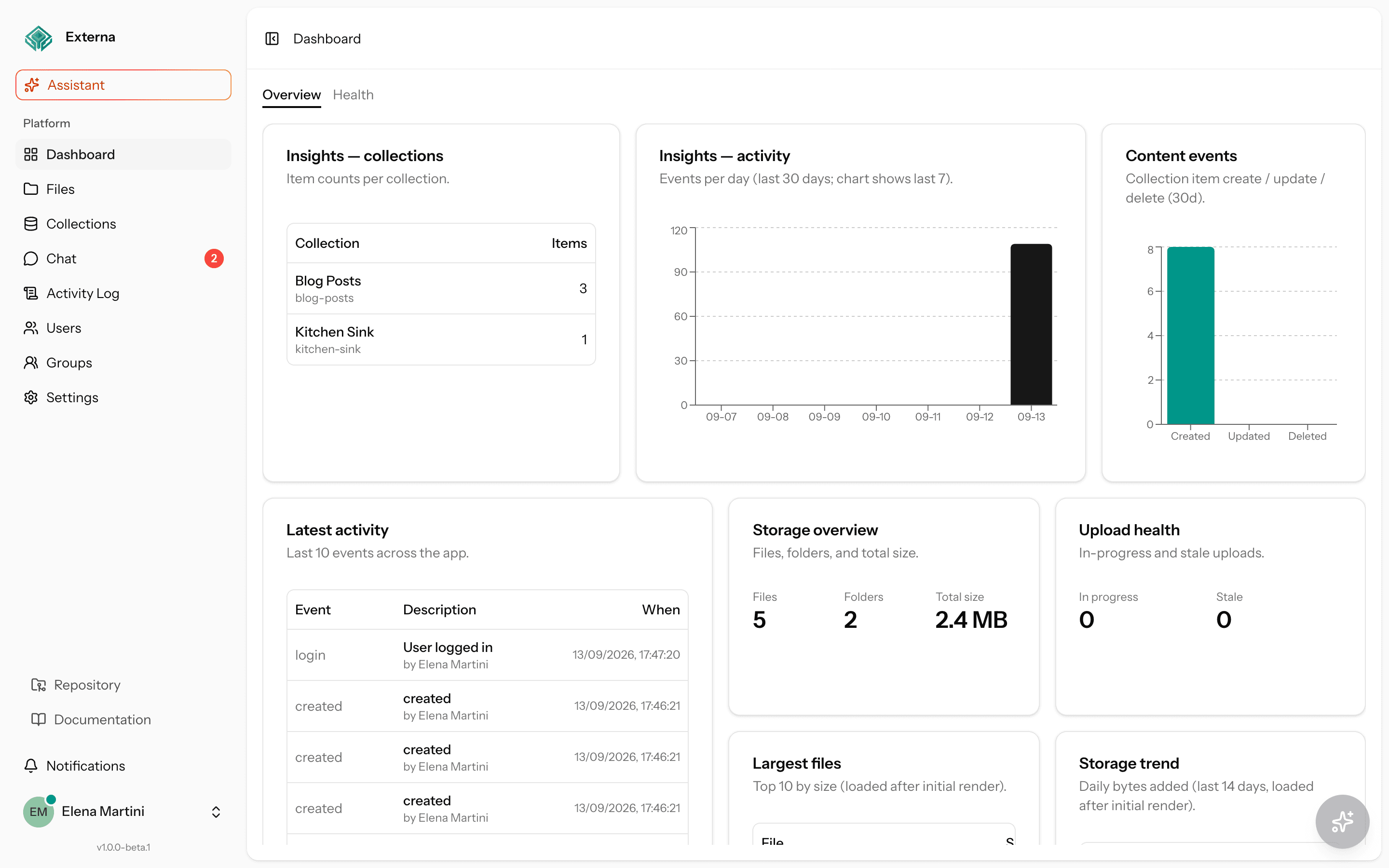
Externa is an admin application for managing structured content, hierarchical files, and team access — with an optional in-app AI assistant and a headless Public CMS API (/api/v1) for websites and integrations.
Quick Start
Herd .env, seed roles, and the minimal commands to run locally.
Architecture
How Laravel, Inertia, routes, services, and the React shell fit together.
Permissions
Spatie RBAC with group-inherited effective permissions and built-in roles.
Public CMS API
Headless /api/v1 — public role, collection access matrix, API keys, and setup.
Related packages
externa-core (app) · externa-bruno (runnable API + GraphQL collection). Endpoint request/response examples are in Public CMS API and GraphQL; Bruno is the companion to execute them.
What Externa is
Externa ships as the externa-core repository: a Laravel 13 backend with an Inertia + React 19 frontend. Operators use the full admin UI; external clients use the Public CMS API when you grant collection access:
- Dynamic collections — define collections and fields, then create and edit items with typed, often translatable data.
- Public CMS API — headless
/api/v1for anonymous (publicrole) and Bearer API-key access, gated by a per-collection create/read/update/delete matrix (guide); GraphQL at/api/graphql. - Hierarchical files — a tree of folders and files with upload, versioning-related flows, duplicate, and async zip download.
- Access control — Spatie Laravel Permission roles and permissions for the admin UI, extended with user groups so effective permissions can be inherited.
- Project settings — content locales, sidebar modules, registration/password policy, transform presets, outbound webhooks, and branding (guide).
- In-app AI — an assistant built on laravel/ai that exposes tools (collections, files, users, imports, activity logs, and more) while respecting the signed-in user’s effective permissions.
- Outbound webhooks — HMAC-signed domain events to a project URL (guide).
- Auditability — activity logging (Spatie Activitylog) and in-app notifications for long-running work.
The default local minimal stack uses SQLite, database drivers for session / cache, and Vite for the React bundle. The documented full stack (Herd Redis) uses QUEUE_CONNECTION=redis + Horizon, Reverb, and Pulse — see Minimal vs full stack. Production databases: Supported databases (Postgres recommended; MySQL 8+ / MariaDB 10.6+ supported). Async features always need a queue worker.
What's new (ops)
Aligned with externa-core v1.0.0-beta.3 (docs site 1.0.4). Full per-version history: Changelog.
- Install / upgrade — Packagist create-project (manual Packagist submit still pending),
externa:install, Upgrade +externa:upgrade, Backup & restore, Production without Redis - Ops / Docker — Deploy with Docker (GHCR quick Compose), multi-arch Deployment bake, managed Compose profile, Reverse proxy cookbook
- Security / release — CI audits + Dependabot (Contributing), CodeQL/secrets (Security checklist), API 1.x compatibility, Releasing
- AI / DX — ManageRoles duplicate, embeddings-backed
SearchSimilarCollectionItems, Dev Container (Installation), GA readiness - Earlier ops: Horizon, Reverb & Echo, Pulse & Health, Minimal vs full
Who it is for
| Audience | Why Externa fits |
|---|---|
| Product / content operators | Manage collections and items without writing migrations for every schema change. |
| Internal platform teams | Ship a branded admin with users, groups, roles, and a file tree out of the box. |
| Developers extending externa-core | Clear split of Actions, Services, Jobs, AI tools, and Inertia pages under resources/js. |
| Teams experimenting with AI ops | Point LOCAL_AI_* at LM Studio, vLLM, or another OpenAI-compatible gateway and keep tools permission-gated. |
Note
Externa assumes you control the deployment and the AI gateway. It is designed for trusted operators (admin users), not as a public multi-tenant SaaS shell without further hardening.
Feature overview
Collections and items
Collections are first-class models (Collection, CollectionField, CollectionItem, CollectionItemValue). Field behavior is driven by enums and validation on the server; the React UI under resources/js/pages/collections mirrors those capabilities. Content locales for translatable field data live in project settings (seeded from config/collections.php, defaults en / it), separate from the admin UI locale in config/i18n.php.
HTTP surface lives in routes/collections.php and controllers under App\Http\Controllers\Collections.
Hierarchical file manager
Files form a tree (File, related upload/version models). Controllers under App\Http\Controllers\Admin\FileController expose browse/upload/move/duplicate/zip flows. Large duplicates and multi-file zips are handled asynchronously:
DuplicateFilesJobPrepareFilesZipJob
Thresholds and zip retention come from config/files.php / FILES_* environment variables. Public disk URLs require php artisan storage:link.
Users, groups, roles, and permissions
Built-in roles (from App\Enums\RoleEnum):
| Role | Seeded meaning |
|---|---|
super-admin | All permissions |
admin | All permissions |
reader | Only can-show-* permissions |
public | System role for anonymous /api/v1 (not assignable to users) |
Permissions are seeded from PermissionEnum via PermissionSeeder and attached in RoleSeeder. Beyond direct Spatie assignments, user groups contribute permissions; App\Services\Authorization\EffectivePermissionResolver computes the union used by the UI and AI tool checks. Headless API grants live in Collection access on each role (Public CMS API).
Admin CRUD routes live in routes/admin.php (users, groups, roles, permissions, activity logs, files, API keys).
AI assistant
The default agent is App\Ai\Agents\AppAssistant, with tools under app/Ai/Tools such as:
- Collection and item management / query / export
- CSV and remote JSON import (plus job status)
- Files, users, groups, roles
- Activity log query and rollback of the last AI turn
- PDF text extraction and AI sync sources
Default provider is local (AI_DEFAULT_PROVIDER=local), talking to an OpenAI-compatible gateway at LOCAL_AI_URL (default http://127.0.0.1:1234/v1). Chat UI and API routes are under routes/ai.php and resources/js/pages/ai.
Imports that can take time use ImportCollectionJob and the database queue.
Activity and notifications
Spatie Activitylog records notable changes (ACTIVITYLOG_*). The admin activity log UI and notification endpoints (unread count, mark read) help operators follow async work without watching the queue terminal.
Technology stack (externa-core)
| Layer | Choice |
|---|---|
| PHP | 8.3+ (repo pin often 8.4) |
| Framework | Laravel 13 |
| Auth | Laravel Fortify |
| SPA bridge | Inertia Laravel 2 + React 19 |
| Typed routes | Laravel Wayfinder (generated TS under resources/js) |
| Permissions | spatie/laravel-permission |
| Activity | spatie/laravel-activitylog |
| AI | laravel/ai |
| Frontend build | Vite, Tailwind CSS 4 |
| Tests | Pest 4 (Feature / Unit / Browser) |
Repository layout at a glance
You will spend most of your time in:
app/— Actions, Ai, Enums, Http, Jobs, Models, Services, …routes/—web.php,api.php(/api/v1),admin.php,settings.php,collections.php,ai.php,console.phpresources/js/—pages,components,hooks,lib, Wayfinder outputconfig/— notablyai.php,collections.php,files.php,super_admin.php,permission.php,fortify.php
Full directory guidance is on the Project layout page. Environment keys are listed under Environment variables.
Next steps
- Install locally — preferably with Laravel Herd. Start with Quick Start; deeper detail in Installation.
- Sign in — default super admin from
config/super_admin.phpissuperadmin@example.com/password(override withINITIAL_SUPER_ADMIN_*before seeding). - Keep a queue worker running — minimal:
composer run dev(queue:listen). Full Redis stack:composer run dev:full(Horizon + Reverb + Pulse). Zip, duplicate, and import features need a worker. - Optional: AI — start a local OpenAI-compatible server, confirm
LOCAL_AI_URL/LOCAL_AI_MODEL, then open the AI chat in the admin. - Learn the model — read Architecture, Effective permissions, and AI assistant model before extending tools or policies.
Warning
Do not use the default seeded password outside local development. Set INITIAL_SUPER_ADMIN_EMAIL and INITIAL_SUPER_ADMIN_PASSWORD (and related name fields) before php artisan db:seed in shared or production environments.